What's New in This Update
Version: 1.3.0
Release date: Sep 30, 2026
1. Exchange integration: Hyperliquid (beta):
The platform now supports connecting Hyperliquid in closed beta mode.
Meanwhile, the Bybit exchange becomes available in open beta status.
You can connect your Hyperliquid API keys and work with several exchanges at once from a single terminal.
Supported exchanges: Binance | Bybit | OKX | Hyperliquid
What this gives you:
- working with several exchanges at the same time;
- quick switching between trading venues;
- a single interface for trading and analysis.
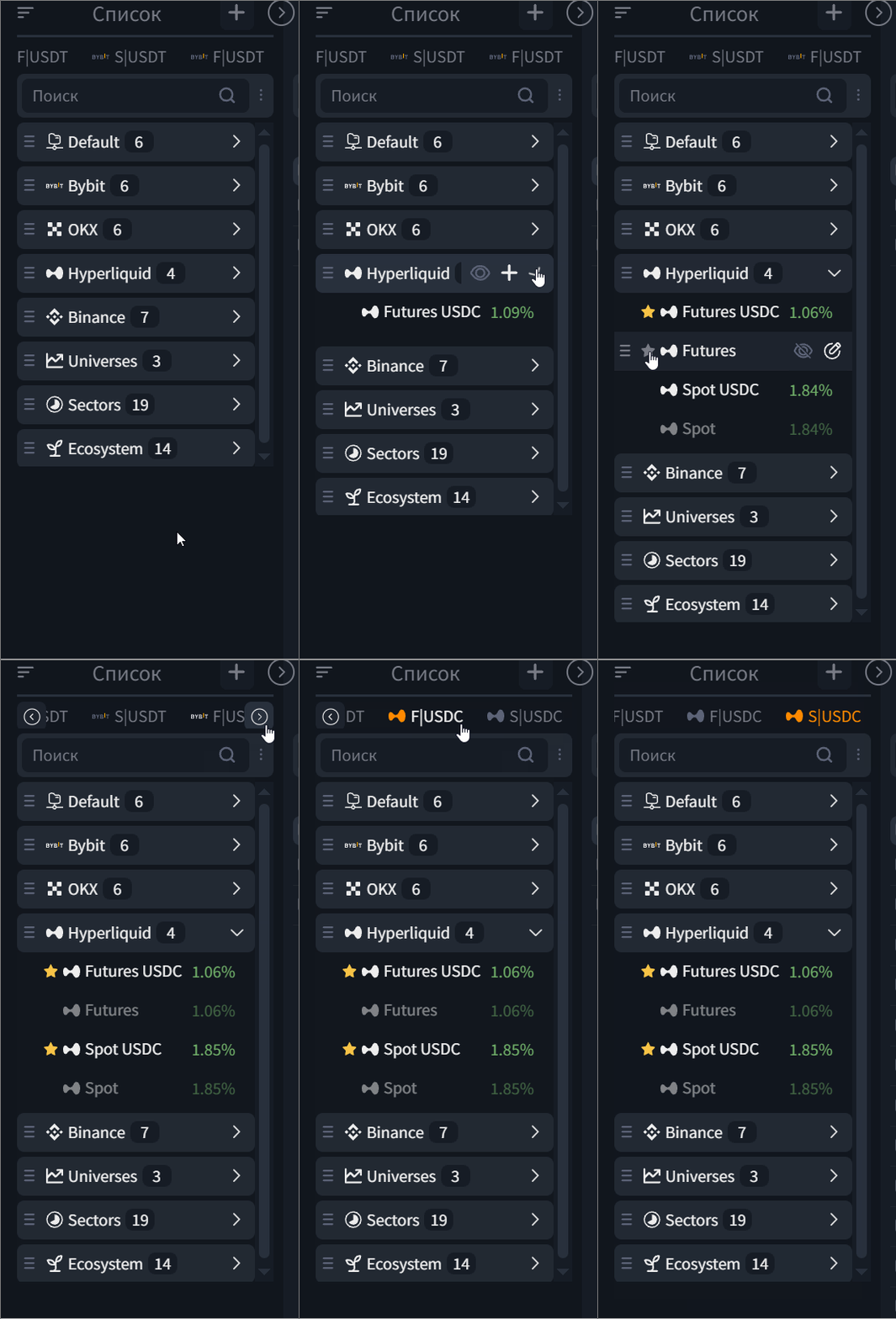
The Hyperliquid integration is running in closed beta. To connect, please reach out to support.
2. Squeeze groups: launch several squeezes with one button.
You can now combine several SQ presets into one group and launch them in two clicks on the pair of your choice.
Each launch creates a separate strategy, but they all stay linked: you see them as a single row and can manage the group as one unit.
A group is a saved template. The same set can be launched repeatedly, on different pairs, and each launch runs independently.
The "Squeeze groups" window opens from:
- The widget in the terminal header (off by default — add it via the header widget settings)
- The strategies block, via the «+» button
- Via the group's menu.
The widget shows only active groups across all pairs: the number of running groups and their combined PnL.
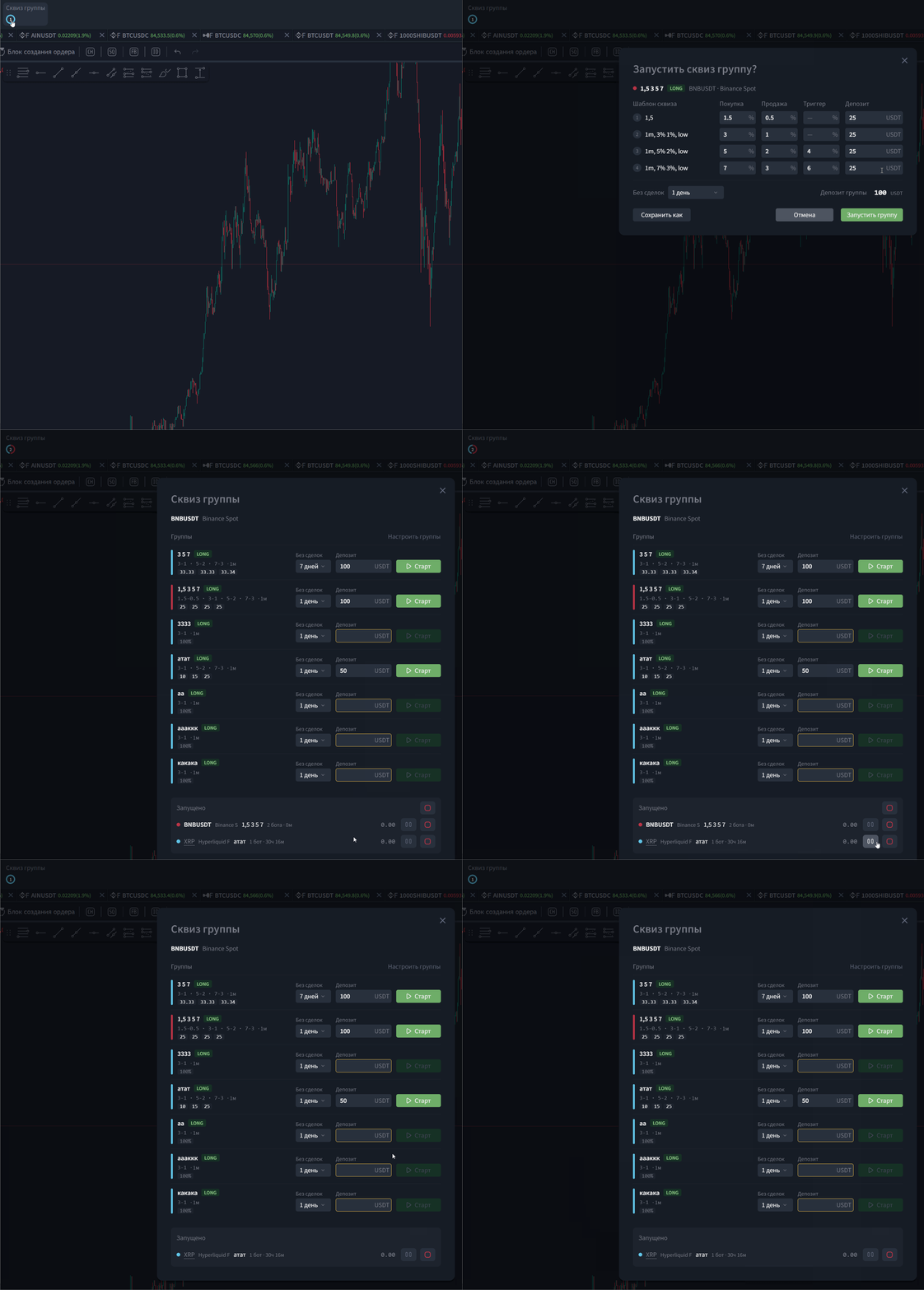
Configuring groups
In the group editor you can:
- combine previously created presets into groups
- set deposit shares
- choose a color tag
- set a name and side (Long/Short)
- set the total deposit
- set an idle-without-trades period and tie the group to an asset («Asset-only»).
Presets are taken from your squeeze settings.
Available on plans:
Free, Light — feature not available.
Base — up to 5 groups.
Plus — up to 20 groups.
Custom, Business — up to 50 groups.
3. Trading-pair search widget: now a mini screener
The trading-pair search window in the terminal header has been completely reworked. It used to be a simple field for typing a symbol; now it's a full-fledged tool for finding and picking trading pairs without ever leaving the chart.
What's new:
Tabs for quick filtering: All, Favorites, New, Listings, Pre-Market, Watchlist, Delisting, L1/L2, DeFi, AI, TradFi, and others. Plus a new category, Crypto.
Exchange filters: you can add one or several exchanges to favorites for quick access.
Expanded table: shows symbol, name, price, 24h change, and volume.
Sorting: by any column, in one click.
Keyboard control: open with / or Ctrl+K, navigate with the arrow keys, select with Enter, close with Esc.
Now, finding a promising pair doesn't mean switching to a separate block — everything's right at hand.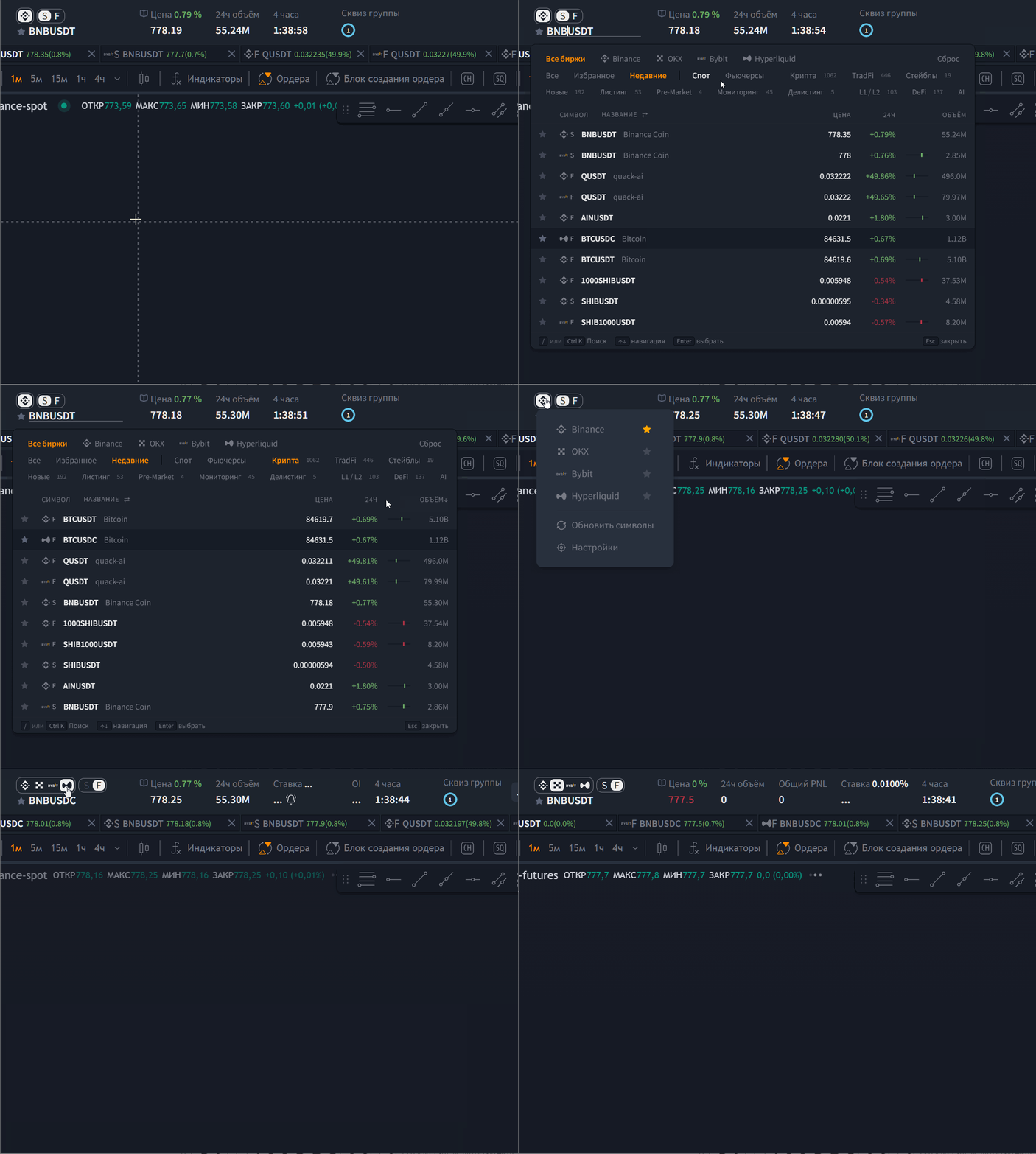
4. Upgraded Order Book and Trades Feed: deeper into the market, more flexible settings
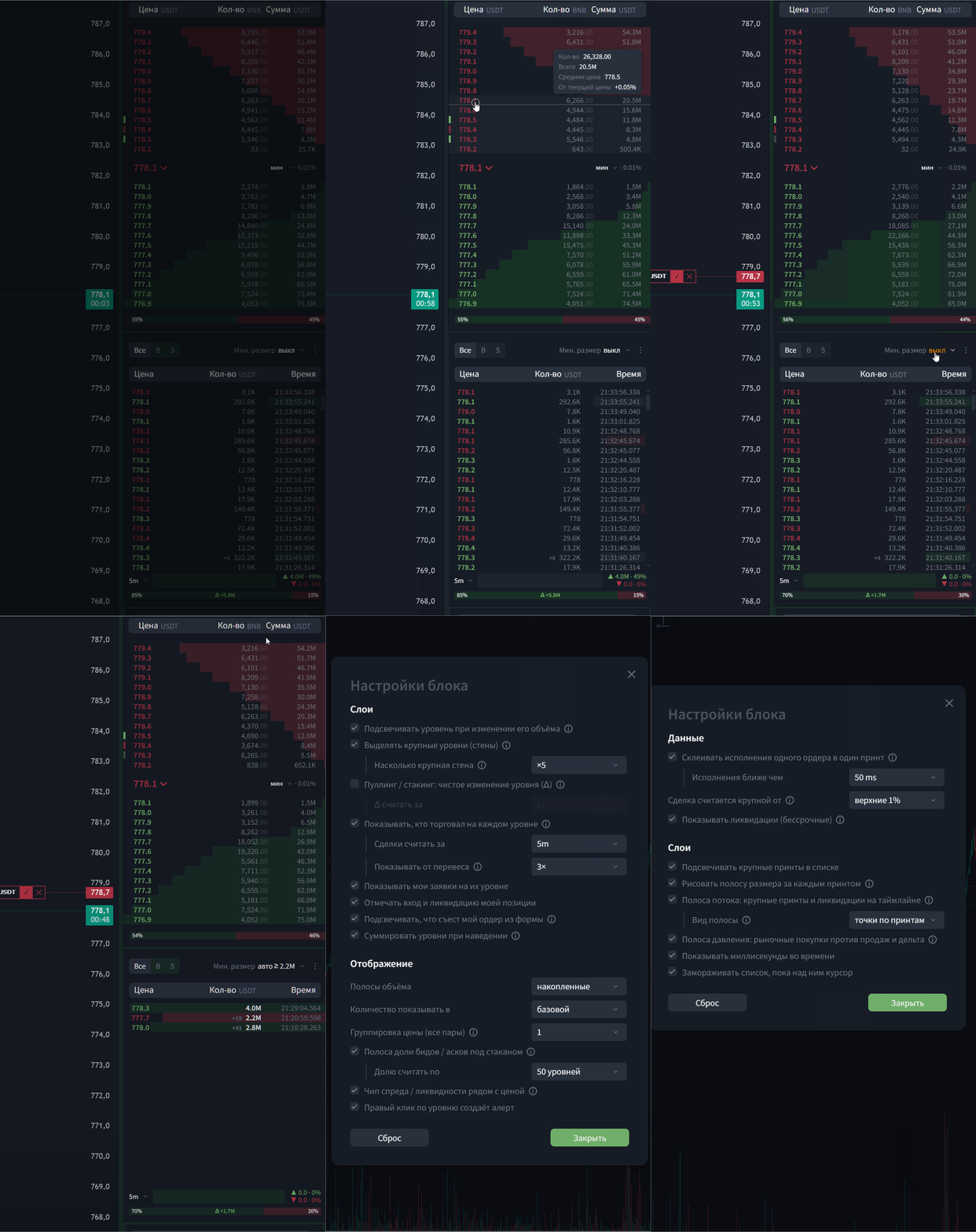
The «Order Book» and «Trades Feed» blocks got a major upgrade. They're no longer just a display of orders and trades — now they're full-fledged market-microstructure analysis tools.
You can turn individual layers on and off, tune the visualization to your trading style, and see things that used to be hidden.
Common to both blocks
Both blocks now have a «⋮» button in the top-right corner — this opens settings. Inside are three groups: Layers, Display, Data. Every more advanced option comes with an (i) tooltip. Any layer can be turned on or off independently, and the «Reset to defaults» button restores everything back to how it was. Settings are stored locally in your browser, separately for the order book and the feed.
Also, in both blocks, clicking the Qty column header toggles the unit: base currency, e.g. (BTC), or quote currency (USDT).
What's new
Order Book:
- Pulling/stacking — see where liquidity is being placed and pulled.
- Walls — large levels are highlighted.
- Who traded at the level — a buy/sell imbalance strip.
- Markers for your own orders, position entry, and liquidation.
- Highlighting for the levels your form order would eat.
- Summary on hover — volume, average price, slippage.
- Spread chip — effective spread for volume.
- Price grouping ×1…×1000 (works on all pairs).
- Bid/ask share bar.
- Left-clicking a price in the order book fills in a limit order
- Right-clicking a price in the order book sets an alert
Trades Feed: - Reconstructed prints (×N) — merged fills.
- Large prints — highlighted in bold.
- Liquidations (LIQ) — rows in the feed.
- Flow bar — a timeline of large trades and liquidations.
- Pressure bar — taker delta.
- Side and minimum-size filters.
- Milliseconds, hover pause
- Clicking a row fills in a limit order
 Available on plans:
The new options are available to all users. That said, some analysis tools depend on your plan:
Base and up: unlock the order-book delta, the liquidation timeline, and large trades in the feed.
Plus: everything in Base, plus the order-book imbalance (bid/ask share bar).
For more on how the order book and trades feed work, see the knowledge base.
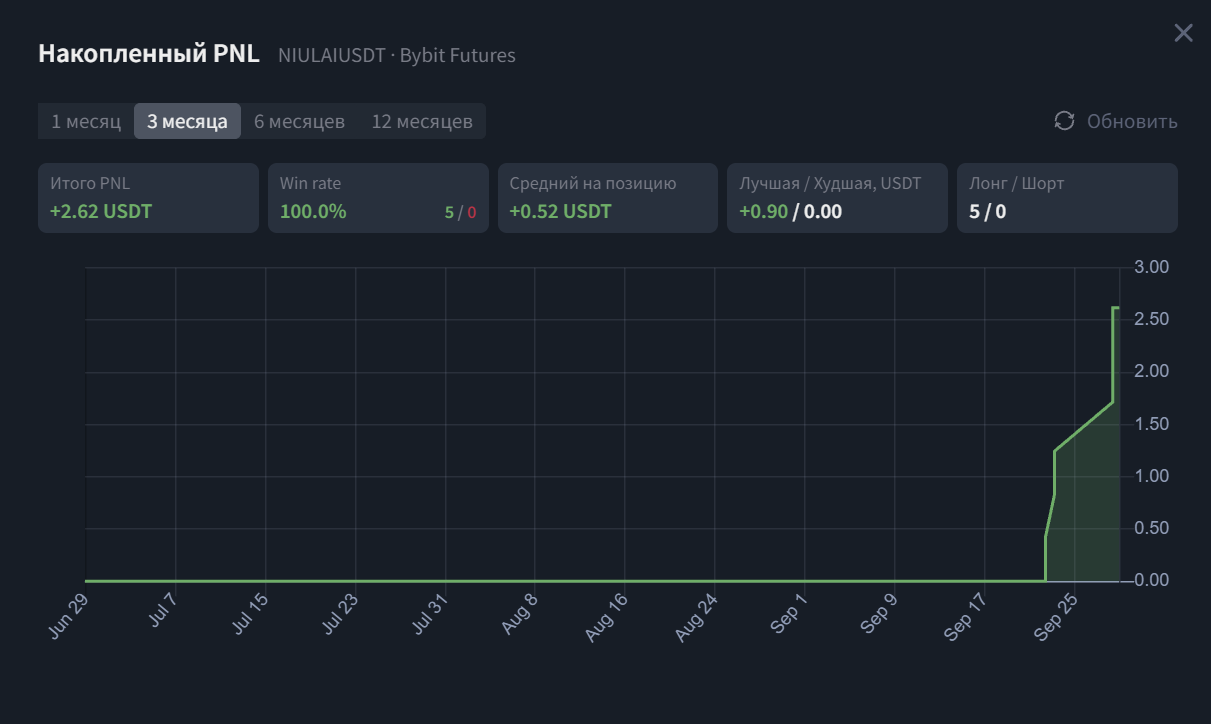
5. Updated per-pair Cumulative PNL (cPNL) widget (for Futures)
You can now track cumulative PNL by trading pair right from the platform's header.
How to open it: Click the PNL widget in the platform's top bar.
What's inside: Detailed stats for the selected pair (e.g. QNTUSDT on Binance Futures) and an interactive returns chart.
Analytics: The widget shows Total PNL, Win Rate (with trade count), average PNL per position, best/worst trade, and the Long/Short ratio.
Periods: You can choose a 1, 3, 6, or 12-month timeframe.
Available on plans from Plus and up.
6. New sign-in methods
The «Sign-in & Security» section has been updated. Managing your LEXX ID account is now centralized, and the list of sign-in methods and security settings is significantly wider.
Where to find it:
Settings → Account
What you can configure:
Sign-in methods: link an Email, Google account, or wallet. Methods you no longer need can be removed. Sign in via Passkey or linked services is also available if you want it.
Any changes made here apply across all LEXX products. The new management hub opens right from the terminal and runs in a separate tab.
6. Grouping strategies in the table
New grouping mode: Strategies can now be combined into separate, collapsible rows.
Where to find it:
Strategies block → top right, next to the "traffic light" filter.
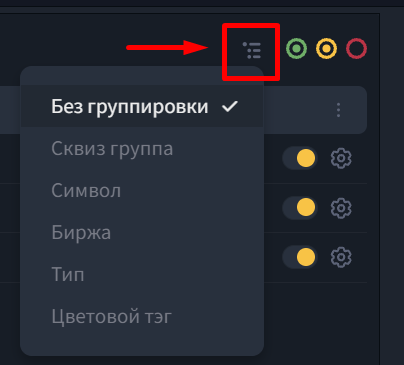
Grouping options: By squeeze group, symbol, exchange, bot type, or color tag.
How it works: The chosen criterion forms a separate layer that the matching strategies are collected into.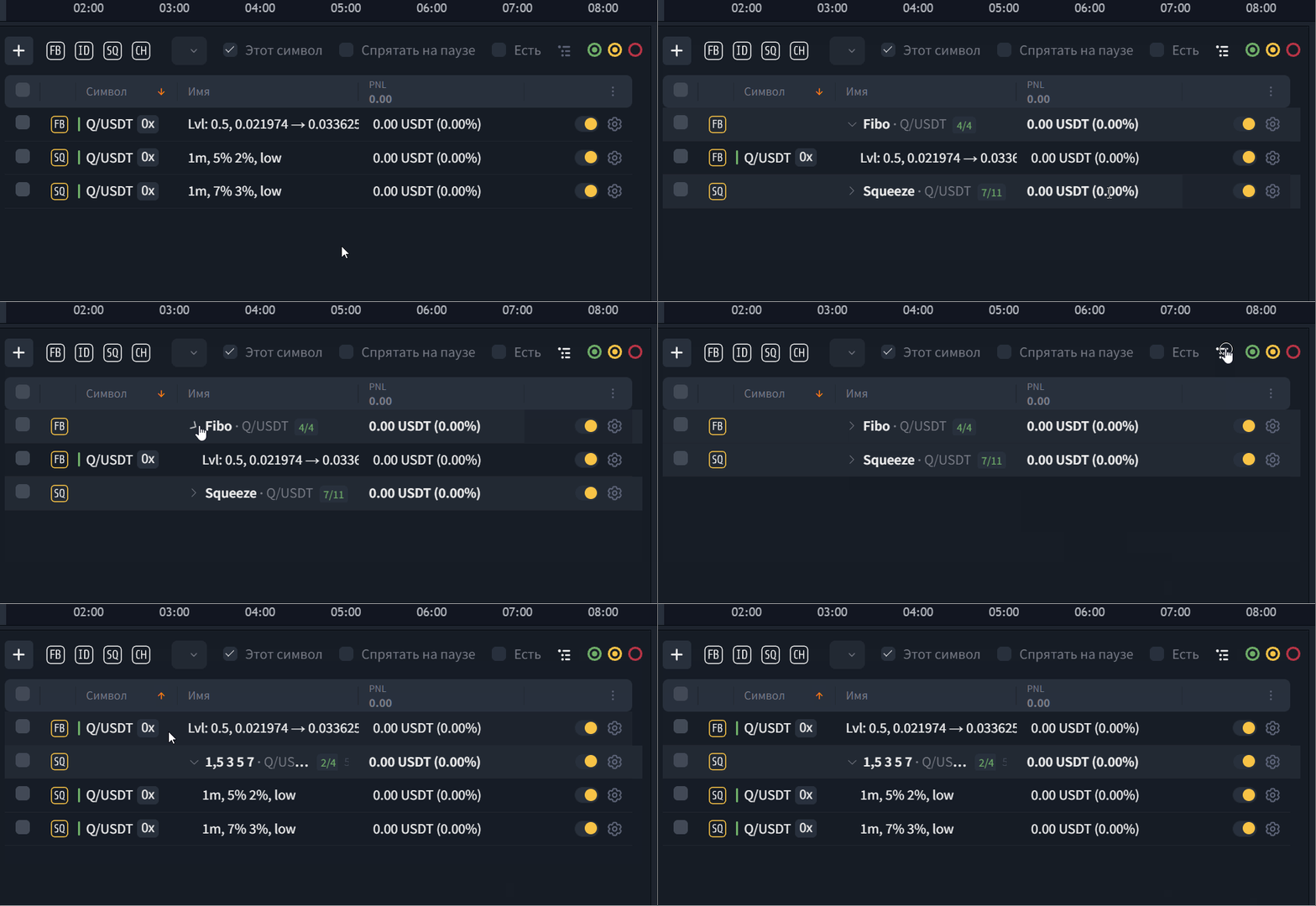
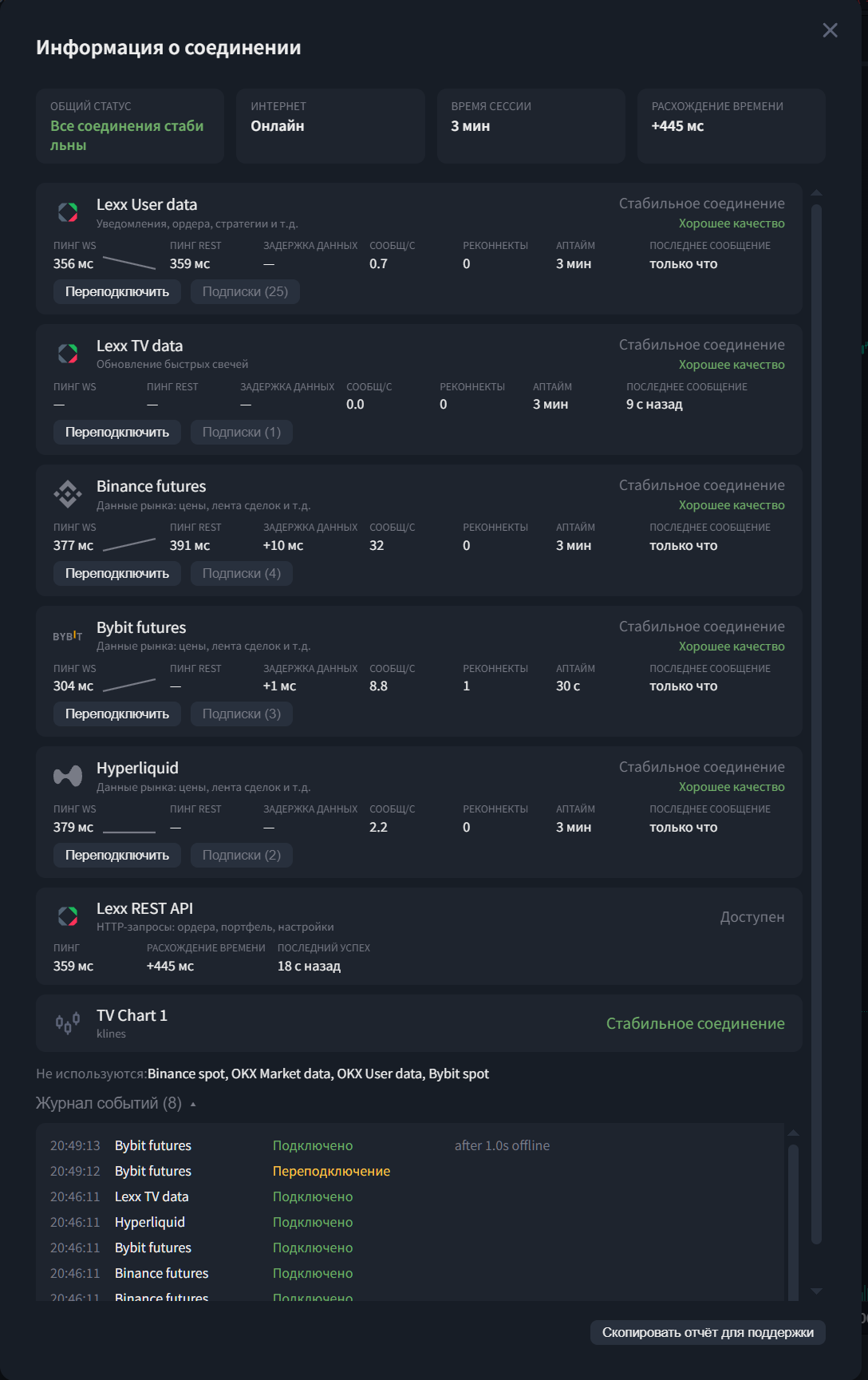
7. Connection info
- Detailed metrics per stream (ping, latency, messages, reconnects, uptime).
- Overall system status: internet, session time, time drift.
- Manual reconnect for each connection.
- A log of connection and disconnection events.
- A «Copy support report» button.
Other improvements and fixes
- Platform performance has been optimized.
- High-performance mode (an experimental «Separate market data thread» option has been added. Processing of exchange streams, the order book, and the feed can now run in the background. The interface becomes noticeably more responsive even on weaker machines and during sharp market moves.
How to turn it on:
Settings → Interface → Active exchanges→ Market data → «Process the order book and feed on a separate thread». Off by default.
- Added widgets: mark and last price, and open interest.
- Improved block editing. In edit mode, platform blocks can now be resized not only from the bottom corner but also from the left and right edges. This makes arranging your workspace more convenient.
A number of other bugs and issues were also fixed.
We hope you enjoy this update and that it makes using the platform even more comfortable. We're always open to your ideas, which you can submit from the profile menu at the top of the terminal.
Note for users:
- We recommend refreshing the platform page after the update so your browser picks up the latest data.
Was this article helpful?
That’s Great!
Thank you for your feedback
Sorry! We couldn't be helpful
Thank you for your feedback
Feedback sent
We appreciate your effort and will try to fix the article
Ready to try it live?
Everything in this guide works in the LEXX terminal — exchange API connections, trading strategies and automation.
Open the terminal About LEXX Platform