Available for the following licenses:
New features are available to all users. However, certain analysis tools depend on your license level:
Base and higher: Provides access to order book delta, the liquidation timeline, and large trades in the tape.
Plus: Everything available in Base, plus order book imbalance (bid/ask ratio bar).
This block shows executed trades for the current pair in real time, plus large trades and liquidations on a timeline below the table.
With the latest update, the feed gained a side filter, print reconstruction, large-trade highlighting, a liquidation feed, and two new bars below the table — flow and pressure. Below is a detailed description of every feature.
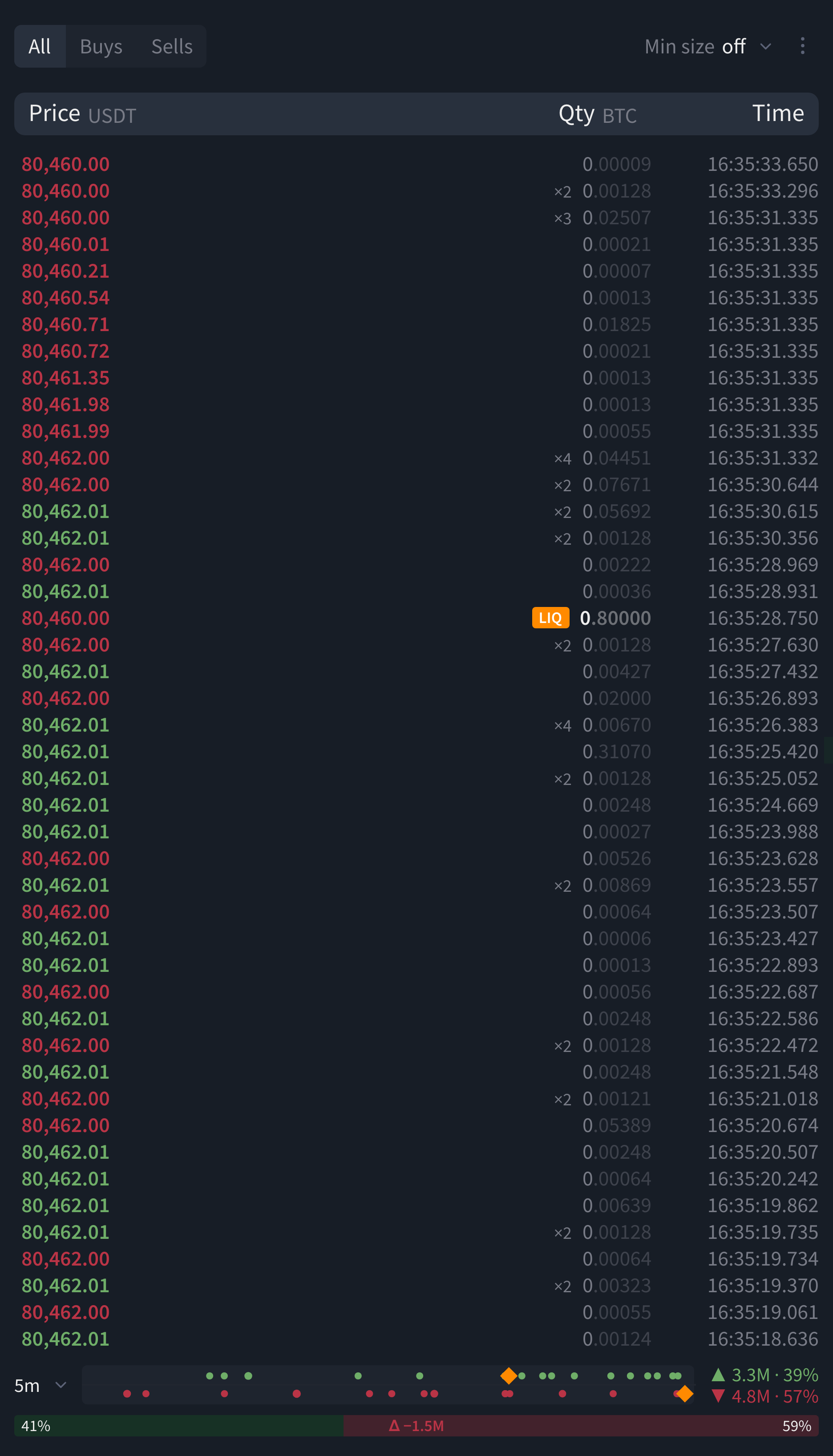 BTCUSDT feed — side filter and "Min size" in the header, prints marked ×N, milliseconds, a LIQ row, below the table a 5-minute flow bar (dots, orange liquidation diamonds, totals on the right) and a pressure bar with delta
Shared trade log
The order book and the trades feed read the same stream of trades and liquidations for the current pair. The "large trade" threshold, print merging, and the accumulation window are all set in the feed's settings ("Data" group), but they also affect the order book's linked "who traded at the level" layer. As a result, the same "large trade" number is used across the whole terminal: highlighting in the feed, dots on the flow bar, the "auto" filter, and the strips in the order book are all in sync.
Block settings
The top-right corner of the block has a "⋮" button. It opens the "Block settings" window with the "Data" and "Layers" groups. An (i) icon with a tooltip sits next to more advanced options. The "Reset to defaults" button restores every parameter to its initial state.
Settings are stored in the browser (localStorage), separately for the feed and for the order book. They don't sync across devices and aren't tied to your account.
 feed settings window - "Data" group (merging, large-trade threshold, liquidations) and "Layers"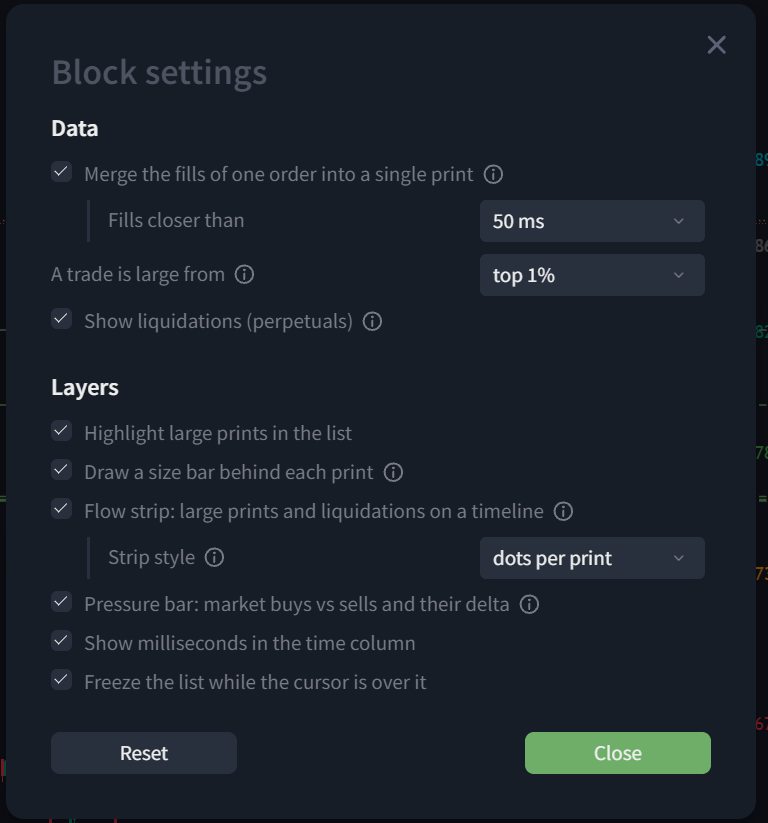
Narrow mode
When the block gets narrow, the side-filter buttons shrink to "B / S", milliseconds in the time column are hidden, and column headers get shorter.
Quantity unit
Clicking the "Qty" column header toggles the unit: base currency or quote currency (USDT). The current unit is always shown next to the header.
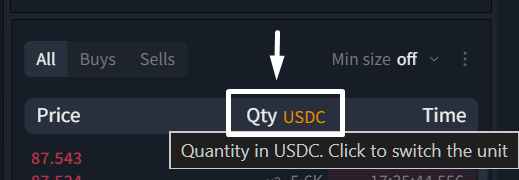
Block header
Side filter: All / Buys / Sells
Three buttons on the left of the header leave either all prints, only market buys, or only market sells in the list — handy when you need to watch only aggressive buyers or only sellers while the feed is moving fast. In narrow mode, the labels shorten to "B / S". The choice is remembered.
Min. size: off / auto / 1K / 10K / 100K / 1M
A dropdown on the right hides prints smaller than the selected amount in quote currency (USDT):
- off (default) — all prints are shown.
- auto — follows the current "large trade" threshold and adapts to the pair: the label shows a live value, e.g. "auto ≥ 158.7K". On BTC this will be in the hundreds of thousands; on a less liquid coin, in the low thousands.
- 1K / 10K / 100K / 1M — a fixed threshold.
There's no free-form input, only presets. The filter is global — one setting for all pairs. The old per-pair filter based on base-currency volume is no longer used.
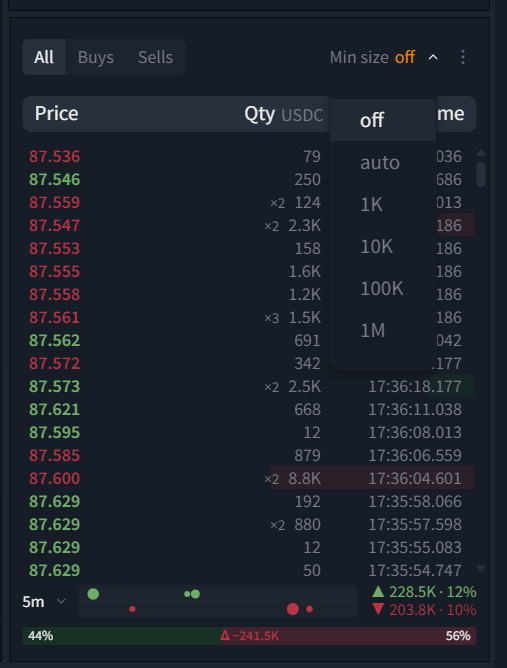 feed header with the "Min size" list open — off, auto, and four fixed thresholds in quote currency
Feed rows
Reconstructed prints (×N)
An exchange splits a single market order into several fills against different limit orders. The feed merges same-side, same-price fills that land within a 50, 100, or 200 ms window (100 ms by default) into one print and tags it "×N", where N is the number of fills. This shows the real size of market participants in the feed instead of small technical crumbs — on BTC spot, 1000 fills typically become around 540 prints.
The "large trade" threshold, the flow bar, and the minimum-size filter are all calculated from prints, not individual fills. Turning off merging in settings ("Data") returns to a raw stream of unmerged fills.
Large prints
A print counts as large if it falls into the top 1, 2, or 5% of recent print sizes (the threshold adapts to the specific pair) or exceeds a fixed amount of 10K, 50K, 100K, 500K, or 1M in quote currency (top 1% by default). Large prints are highlighted in bold in the list.
This is the same unified "large" threshold that drives the flow bar, the "auto" filter, and the "who traded at the level" strip in the order book. The threshold is computed from the last 512 prints, so it needs a few seconds to "settle" right after switching pairs.
Size bar behind each print
Behind each row is a background bar whose length shows the print's size. The scale is logarithmic: the bar starts at one-twentieth of the large-trade threshold and fills completely at two thresholds. This lets you read trade size with peripheral vision, without small prints collapsing to zero.
Liquidations (LIQ rows)
Perpetual contracts only — spot has no liquidations.
Forced position closures from the exchange's public feed are inserted into the feed by time as separate rows tagged LIQ:
- A long liquidation is a forced sell (red row).
- A short liquidation is a forced buy (green row).
This makes liquidation cascades visible right in the trade stream, where they happen. Note that Binance's API limits it to at most one liquidation per second per symbol, so more liquidations may occur on the exchange than are shown in the feed. On OKX, trade size arrives in contracts rather than coins.
Milliseconds, hover pause, click
- Milliseconds. Print time is printed down to the millisecond (e.g. 14:03:59.125), so you can see the order of trades within the same second. Hidden in narrow mode. On by default.
- Hover pause. While the cursor is over the list, new prints don't shift the visible rows — you can read them calmly. As soon as the cursor moves away, the feed catches up. On by default.
- Clicking a row fills its price and side into the order form.
When the block opens, the last 500 trades are loaded, 1000 are kept in memory, and up to 300 rows are shown on screen.
Below the feed
Flow bar: large trades and liquidations over time
A row below the table shows large trades and liquidations over a chosen window: 1, 5, 15 minutes, or 1 hour (5 minutes by default). The timeline in the middle moves left as time passes. On the right are totals, e.g. "▲ 13.9K · 32%" and "▼ 0.0 · 0%": the value of large buys and sells over the window and their share of the total volume traded in that same window.
There are two display modes (switched in settings, "Layers" → "Bar style"):
- Dots per print — each large trade is shown as a separate dot: buys above the line, sells below it, dot diameter corresponds to the trade's value. Neighboring dots on the same side merge into one, tagged "×N".
- Bars per interval — the window is split into equal intervals, a bar shows large buys of the interval going up and sells going down, scaled to the most active interval. This view is easier to read on a busy market, where dots would otherwise get too crowded.
Colors: green — large buys, red — large sells, orange always means a liquidation (the same color marks LIQ rows in the feed itself). Liquidation side is read from the direction: a long liquidation is a forced sell, drawn downward; a short liquidation is a forced buy, drawn upward. In dot mode, a liquidation is also distinguished by shape — a diamond.
Worth knowing: - The bar is always visible, even when nothing happened — then it's just an empty scale with a line in the middle. That's expected behavior, not a bug. - Hovering over a dot or bar shows a tooltip: time, side, value, number of trades, price. - Hovering over the whole bar shows the large-trade threshold and the totals for long/short liquidations. - The selected window is remembered in the browser.
 flow bar in bar mode — each bar is an interval, buys up, sells down, height scaled to the most active interval, liquidations in orange
Pressure bar
The bottom-most bar of the block: the green part is the share of market buys, the red part the share of market sells, over the same window as the flow bar. In the middle is the delta: buys minus sells in quote currency, e.g. "Δ +14.4K". Unlike the flow bar, this one counts all trades in the window, not just the large ones — it shows who's more aggressive right now: buy-side takers or sell-side takers.

All feed settings
Data
| Option | Values | Default | What it does |
|---|---|---|---|
| Merge fills of one order into one print | on / off | on | Print reconstruction, ×N tag |
| ↳ Fills within | 50 · 100 · 200 ms | 100 ms | Merge window |
| A trade counts as large from | top 1% · 2% · 5% · 10K · 50K · 100K · 500K · 1M | top 1% | Unified threshold for highlighting, the flow bar, the "auto" filter, and the order book |
| Show liquidations (perpetuals) | on / off | on | LIQ rows and markers on the bar |
Layers
| Option | Values | Default | What it does |
|---|---|---|---|
| Highlight large prints in the list | on / off | on | Bold row highlighting |
| Draw a size bar behind each print | on / off | on | Logarithmic background bar |
| Flow bar | on / off | on | Timeline of large trades and liquidations |
| ↳ Bar style | dots per print · bars per interval | dots | How the timeline is drawn |
| Pressure bar | on / off | on | Buys vs. sells and Δ |
| Show milliseconds in time | on / off | on | Hidden in narrow mode regardless of this setting |
| Freeze the list while hovered | on / off | on | Hover pause |
In the header (outside the settings window)
| Option | Values | Default | What it does |
|---|---|---|---|
| Side filter | All · Buys · Sells | All | Remembered |
| Min. size | off · auto · 1K · 10K · 100K · 1M | off | In quote currency, global across all pairs |
| Flow bar window | 1m · 5m · 15m · 1h | 5m | Shared by the flow bar and the pressure bar |
| Quantity unit | base · quote | base | Click the Qty header |
Glossary
- Taker — a participant who fills a market order against someone else's resting order. A market buy = a buy-side taker.
- Print — a feed row: one trade, or a merge of fills from one order.
- Large trade — a print above the threshold: the top N% of sizes, or a fixed amount.
- Taker pressure — market buys versus market sells over a window; Δ is their difference.
- Liquidation — a forced position closure by the exchange. A long is closed with a sell, a short with a buy.
- Quote / base currency — in the pair ONE/USDT, the base is ONE, the quote is USDT.
Was this article helpful?
That’s Great!
Thank you for your feedback
Sorry! We couldn't be helpful
Thank you for your feedback
Feedback sent
We appreciate your effort and will try to fix the article
Ready to try it live?
Everything in this guide works in the LEXX terminal — exchange API connections, trading strategies and automation.
Open the terminal About LEXX Platform