LEXX Trading Platform Update 1.3.2November 25, 2026 This update introduces a new feature, «Working Hours», expands settings for Squeeze groups and templates, and improves multi-account support and guest mode. We have also fixed issues affecting trading strategies, risk calculations, order placement, Hyperliquid integration, chart display, and authentication. Attention: actions required after the update Some previously created Squeeze strategies and alerts require manual updates. See «Important Actions After Updating». 1. Working Hours (beta) PLUS (beta)«Working Hours» - a new tool for managing trading hours in LEXX. It lets you specify in advance when the terminal and trading strategies are allowed to open new positions and when new entries must be restricted. This feature helps maintain trading discipline, avoid undesirable market periods, and automate schedule management.
Key features:
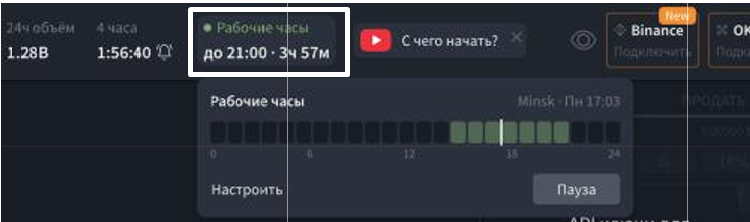
Core principle Working Hours restrict new entries but do not close open positions. Take-profit, stop-loss, and other exit orders continue to operate around the clock. Account scheduleThe feature is primarily controlled through the «Working Hours» widget in the terminal's top bar. The widget displays the current schedule status and the time until the next trading window change. From there, you can open settings, pause manual trading, extend the current window, or start a session. You can configure the following:
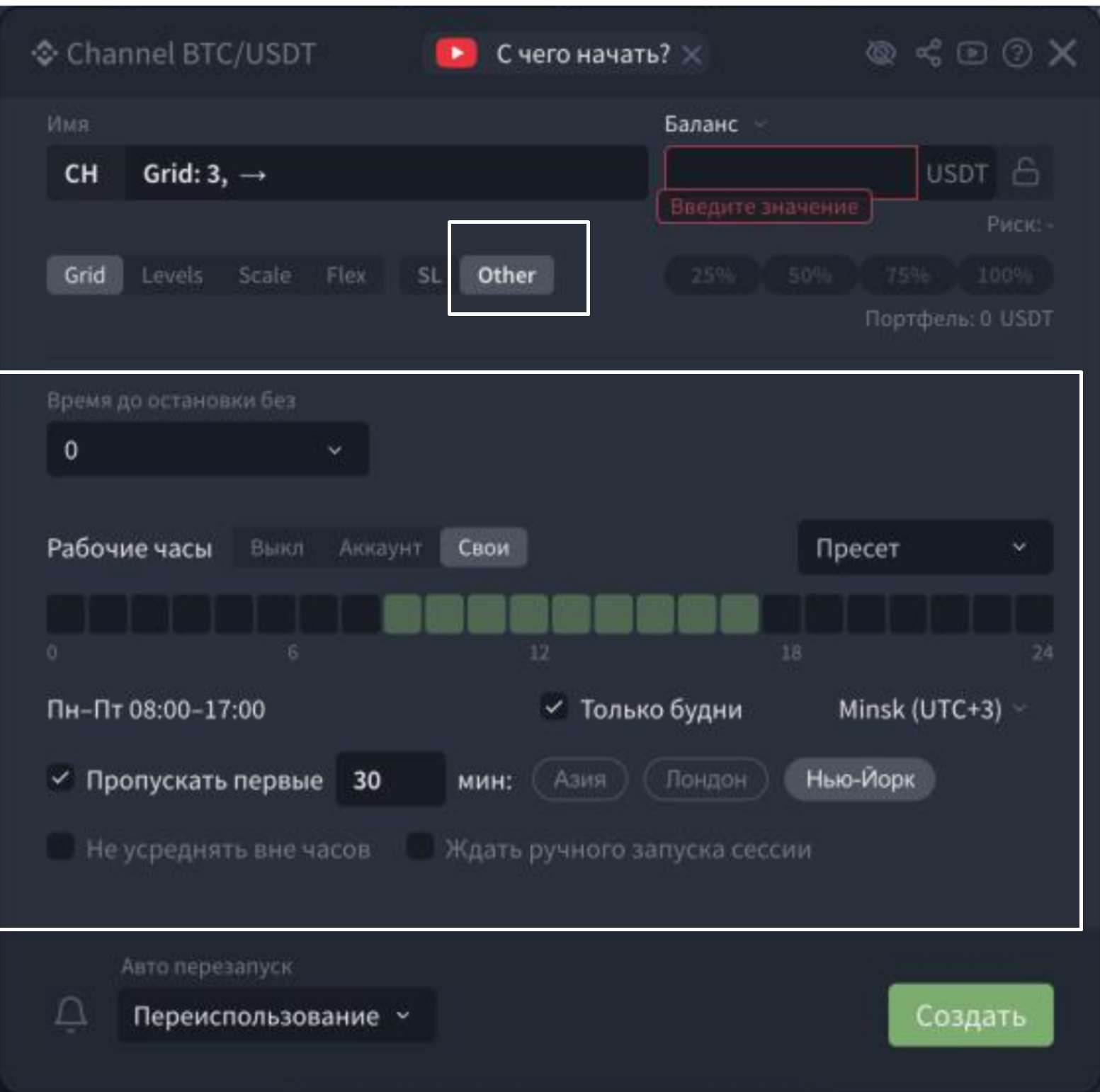
Exclusions let you skip, for example, the first few minutes after a selected trading session opens, funding periods, or the daily close. Example trading window: Mon-Fri, 08:00-17:00
Green indicates when new entries are allowed. Gray indicates time outside the trading window. Trading session managementBy default, trading windows open automatically according to the schedule. With manual start enabled, the user confirms the start of the session directly in the terminal. Additional actions are also available:
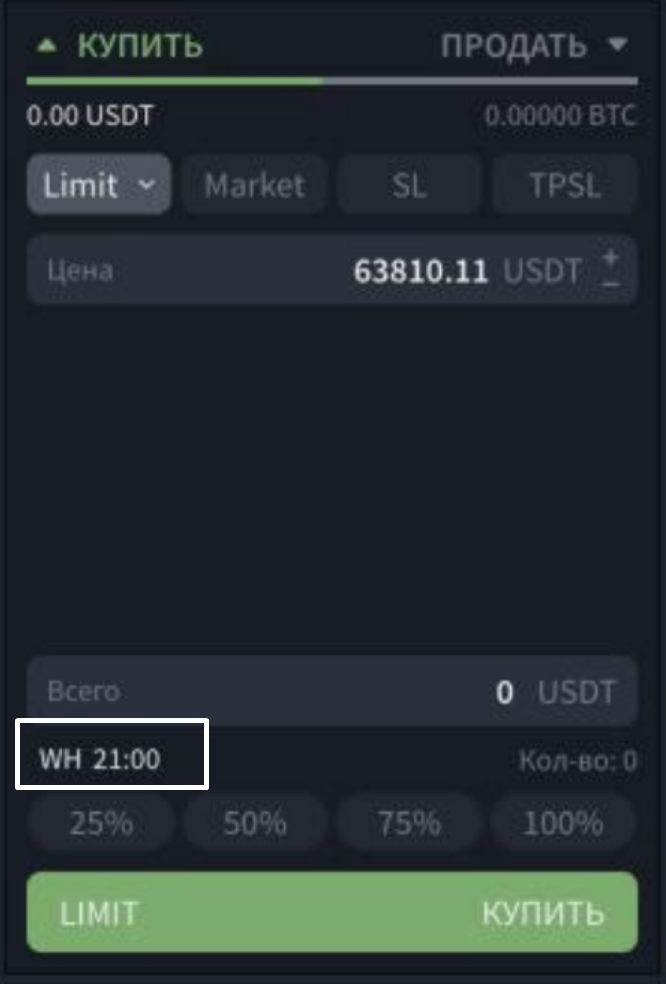
When extending a window, the terminal also offers to extend the cancellation time for existing entry orders restricted by Working Hours. In strict mode, early starts, extensions, and resuming from a pause are unavailable. Schedule changes take effect on the following day (UTC). Manual orders and the WH labelManual entry orders now have a dedicated WH label. This indicates that the order is valid only within the trading window and will be canceled when the window ends if it has not been filled. The label is displayed when placing eligible entry orders and in the Open Orders table. Users can disable WH for an individual order if needed. In that case, the order will not be canceled solely because the trading window has ended. You can choose how the terminal handles manual entries outside the schedule:
For eligible Binance USD-M Futures limit orders, automatic cancellation can be handled by the exchange itself using GTD (Good Till Date). In all other supported cases, scheduled cancellations are handled by LEXX. If an order is partially filled, only the remaining unfilled portion is canceled when its validity period ends. Any position already opened remains intact. Working Hours for trading strategiesTrading strategies support three scheduling modes:
When a strategy uses the account schedule, a copy is stored when the strategy is saved. Subsequent changes to the account schedule do not automatically update that saved copy. A separate «Update Strategies» command is available in the Working Hours widget to update running strategies. Outside the trading window, a strategy:
The «Do Not Average Outside Hours» option additionally prevents an existing position from being increased outside working hours. An individual strategy's schedule can be changed and applied to a running strategy without restarting it. Working Hours display and limitationsNon-trading hours for the account are now shaded on the chart. This makes it easier to distinguish permitted trading periods from closed periods. The shading follows the account schedule, not the individual schedules of trading strategies. The strategies table also shows schedule-related status, such as when the current window ends or when a strategy will next resume. Important limitations
Availability: PLUS licenses and above. The feature is currently in beta testing. 2. Squeeze groupsWe have expanded the capabilities of Squeeze strategy groups. Groups now support:
This allows more centralized management of strategy groups without configuring Working Hours separately for each strategy. 3. Squeeze templatesThe range of settings saved in Squeeze strategy templates has been expanded. Templates now also save:
These settings are restored alongside the rest of the configuration when a saved template is applied. Important for existing templates Squeeze templates saved before this change must be saved again so the new settings are stored and restored correctly. 4. Guest modeThe terminal's tables now display differently for users who have not logged in. In guest mode, the tables are now covered by an overlay with a «Log In» banner. This makes guest mode clearer and provides a quick way to sign in. 5. Account selection via LEXX IDWe have improved sign-in for users working with multiple accounts. If several LEXX accounts are signed in within the browser, users are now prompted to select the desired account. This makes switching between accounts easier and helps avoid accidentally signing in to the wrong profile. 6. Trading strategy fixesFixed issues affecting order placement, calculations, strategy recovery, and configuration saving. Channel Flex1. Working with small deposits Fixed an issue where the first Flex level could consume the entire allocated deposit, preventing the remaining levels from being placed. Now, if a level's amount is too small, it is increased to the exchange's minimum order size, and subsequent levels are placed according to the configuration. The strategy setup form also checks the minimum deposit against the lot-size step and highlights levels that cannot be funded. 2. Moving levels on the chart Fixed duplicate order placement when manually moving a Flex level. Previously, this could produce duplicate lines and oversized orders. Levels and their corresponding orders are now processed correctly. 3. Strategy recovery after restart Fixed an issue where deeper buy levels stopped being placed after Flex was restarted during an open trade. The strategy now correctly resumes placing subsequent levels after recovery. Intraday, Fibo, and Channel4. Intraday - completion of a canceled setup Fixed an issue where canceling a setup removed the limit order, but the strategy remained running and no notification was sent. A canceled setup now correctly terminates the strategy and sends the appropriate notification. 5. Fibo - phase switching Fixed an error Squeeze6. Stop «% from Buy» with a limit order Fixed the placement price of a limit order triggered by a «% from Buy» stop. The limit order is now placed beyond the stop level. The default offset is stop + 0.1%. User action required Squeeze strategies with this configuration saved before the fix must be saved again. 7. Manual allocation of level shares Fixed an issue with manually entered shares when configuring multiple Squeeze levels. Entering a share for the next level no longer overwrites previously entered manual values. 8. PnL calculation for leveraged Boost and Market Squeeze Fixed profit and loss, balance, and percentage calculations when trading with leverage. Previously, these metrics could be calculated from the full leveraged position size rather than the actual margin, resulting in incorrect PnL values, including understated or negative readings. The calculation is now based on margin (trading capital). Other fixes9. Smart Order - risk calculation with a fixed stopFixed the position size calculation for Smart Orders using a specified risk amount and a fixed stop-loss. 10. Hyperliquid - links to trading pairs and strategiesFixed the handling of links to Hyperliquid trading pairs and strategies. Previously, links could open a different pair or display a warning, including for HIP-3 instruments such as In the «Share» window, the quote currency for the relevant instruments now switches automatically to USDC. 11. Hyperliquid - position managementFixed an issue where changing leverage, margin type, or position margin for HIP-3 pairs could affect the wrong asset. Changes are now applied to the correct instrument. Chart and backtest fixes12. Restoring alert functionalityFixed an issue where the bell icon could disappear from an alert line after switching trading pairs. Important If an existing alert has already lost its bell icon and stopped working, it must be deleted and recreated. 13. Duplicate alert linesFixed an issue where clicking an alert in the list after reloading the page could draw a second, identical line on the chart. 14. Platform drawing objectsFixed visual issues affecting platform-generated drawing objects, including zones and higher-timeframe candles. 15. Squeeze backtestRefined Squeeze backtest logic on the chart to match the strategy's actual behavior. The following issues have been addressed:
16. Light chart themeImproved the appearance of chart elements when using the light theme.
Account and authentication fixes17. Correct PLUS license detectionFixed an issue where a paid PLUS subscription could incorrectly be identified by the platform as FREE. 18. Restoring authentication after a long sessionFixed the The interface could appear to show the user as signed in while individual requests failed. Also fixed logout behavior: after ending a session, the user is no longer automatically signed in again. Important actions after updatingFor some previously created settings to work correctly, users need to take additional steps.
We also recommend refreshing the terminal page after the update to load the latest version of the interface. If you use «Working Hours» after the update, check your selected time zone, strategy schedules, and entry-order rules. Update summaryLEXX Trading Platform 1.3.2 introduces new ways to manage trading hours, expands Squeeze group and template settings, and improves working with multiple accounts. The update also fixes issues with Flex, Intraday, Fibo, and Squeeze strategies, Smart Order risk calculations, Hyperliquid tools, charts, backtests, and authentication. The main focus is on correct trading logic, reliable settings storage, and stable platform operation. |
Was this article helpful?
That’s Great!
Thank you for your feedback
Sorry! We couldn't be helpful
Thank you for your feedback
Feedback sent
We appreciate your effort and will try to fix the article
Ready to try it live?
Everything in this guide works in the LEXX terminal — exchange API connections, trading strategies and automation.
Open the terminal About LEXX Platform