A squeeze group is a saved set of 1–5 squeeze presets that launches with a single button on the current pair. The total deposit is split between the presets by weight, and the resulting bots stay linked: they show up as a single line in the widget, in the groups window, and in the strategies table.
Group ≠ launch. A group is a saved template. The same set can be launched many times, on different pairs; each launch lives on its own and stops on its own.
Where to find it
The window opens from three places — all lead to the same place:
- the "SQ groups" widget in the terminal header — the main entry point (you need to add it yourself via widget settings; it's not in the header by default);
- the "+" button in the strategies table → the "Squeeze group" row in the list of bot types;
- the gear icon on a group's row in the strategies table → "Open squeeze groups".
Header widget
The widget shows only running groups — across all pairs, not just the one open on the chart.
- The number in the ring — the count of running groups (not bots). The ring's arcs are the groups' color tags; arc width is proportional to how many groups have that color.
- A dash "—" means nothing is running right now — that's a normal state.
- PnL next to it — the total across all running groups. Shown as
***when balances are hidden. If the absolute value is below 0.005, PnL isn't shown at all. - Clicking the widget opens the window on the groups list.
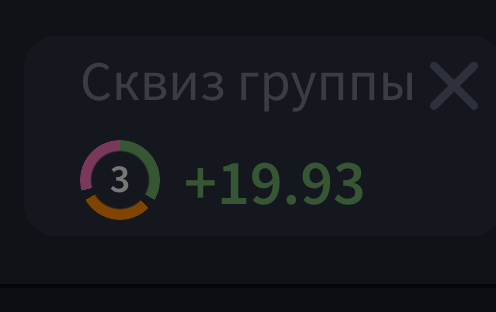 widget with three running groups — a ring showing the number 3, colored arcs, PnL next to it
Window: groups list
The window's title is "Squeeze groups", with the pair and exchange everything will launch on shown below it. The "Groups" section holds your saved templates; the "Manage groups" link on the right opens the editor.
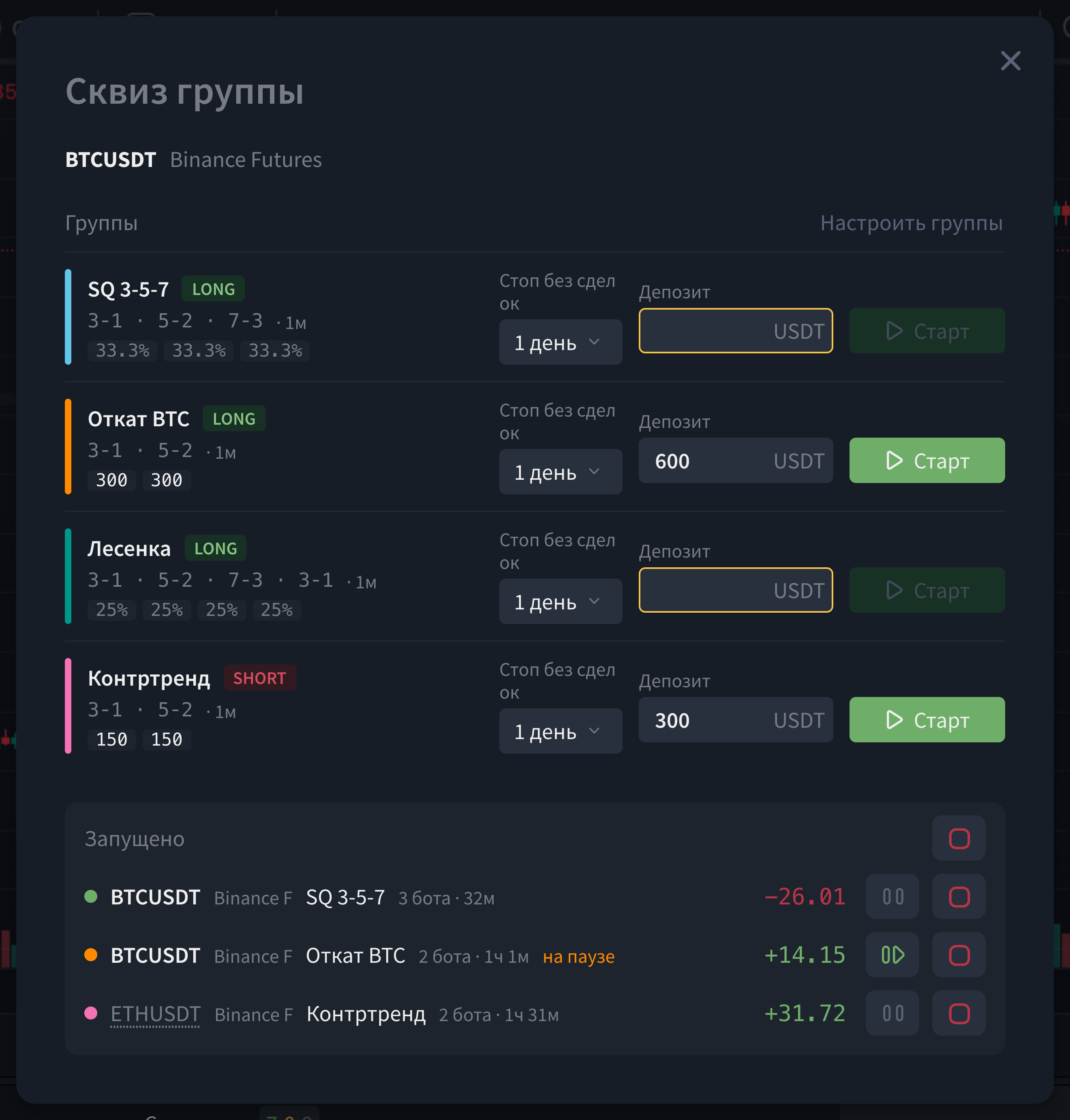
What's shown in a group's row: - a colored tag on the left — the group's tag (its bots get the same color); - the name and a side badge, LONG / SHORT; - composition — one label per preset in "buy-sell" form (e.g. 3-1 · 5-2 · 7-3), followed by the first preset's timeframe;
- a breakdown of amounts per preset (if a deposit is set) or percentage shares.
Controls right in the row:
| Element | What it does |
|---|---|
| Stop if no trades | The period after which the group stops itself if no trade has happened in that time: 1 day / 3 days / 7 days / 1 month / 3 months |
| Deposit | The amount in quote currency for the whole group. A yellow border means the field is empty and the amount will be requested on every launch |
| Start | Launches the group. If the group has "Confirm before starting" enabled, the start window opens first |
When a row can't be launched, an explanation appears under the composition — for example, that all presets were deleted, that a short group was opened on spot (short groups only launch on futures), or that the plan's active-squeeze limit has been reached.
Groups with the "Asset-only" checkbox are shown only on pairs with that base asset, and are listed after the general ones. If your own group isn't showing up, this is likely why.
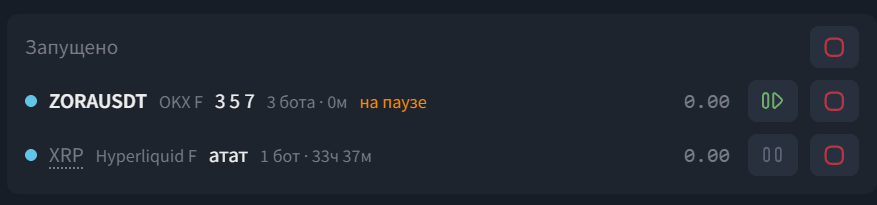
"Running" section
Appears in the same window once at least one group is active. Shows launches across all pairs, refreshing every 2 seconds.
A launch row: colored tag dot · pair · exchange · group name · number of bots · running time · group PnL. A pair other than the one on the current chart is clickable — it switches the chart to it and closes the window.
Controls:
- Pause / resume — one button pauses or resumes all of the group's bots at once; the "paused" label appears only when absolutely all bots are paused.
- Stop — stops all of the group's bots with one command; the launch then disappears from the list. - Stop all — a red button next to the section header, shown when more than one group is running; stops them one by one.
Group editor
Opened via the "Manage groups" link. The tabs at the top are existing groups; the last tab, "+ New group", creates an empty one. Switching tabs discards unsaved edits.
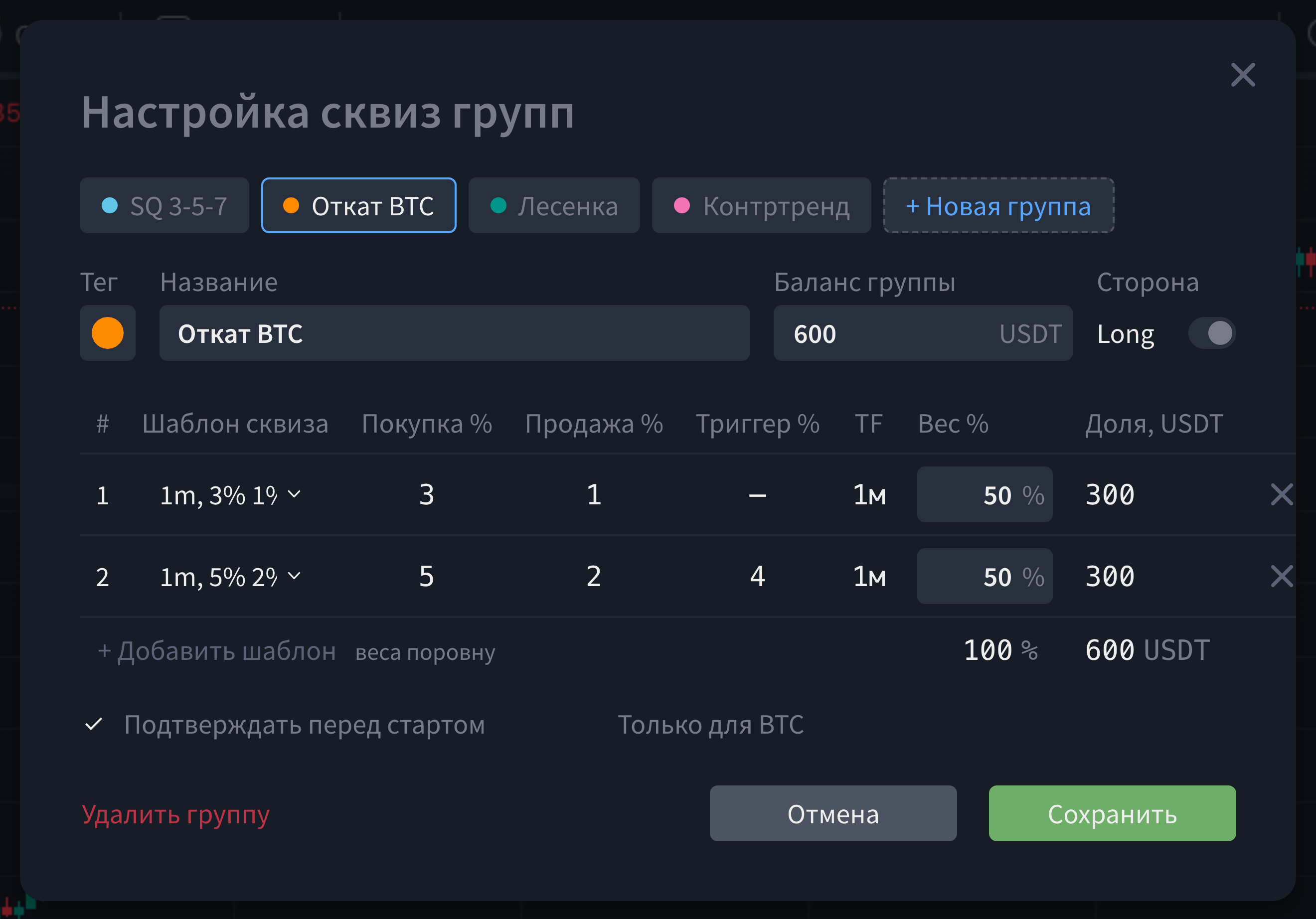 group editor — tag, name, group balance, Long/Short toggle, presets table with weights and shares
Group fields:
| Field | Description |
|---|---|
| Tag | The group's color — one of 9 options; its bots get the same color in the strategies table |
| Name | Up to 30 characters, required |
| Group balance | Default deposit. An empty field means the amount is requested on every launch |
| Side | Long / Short toggle. Switching sides replaces each preset with the preset in the same position from the other side's set |
Presets table. A group holds up to 5 presets. Buy, sell, and trigger percentages are taken from the preset and aren't editable here (they can be changed for a single launch in the start window). The "Weight %" column sets how much of the deposit the preset gets; "Share" shows the same thing in money once a group balance is set.
- As long as weights haven't been touched manually, adding or removing a preset splits 100% evenly.
- Once a weight is edited by hand, a new preset gets whatever remains up to 100 (or 0 if nothing remains).
- A weight sum other than 100 is highlighted in red, but it doesn't block the launch — the deposit is still split proportionally to the weights and spent in full.
Checkboxes and buttons: - "Confirm before starting" — on by default. If turned off, the "Start" button in the groups list launches the group immediately, without a confirmation window. - "Asset-only" — ties the group to the current pair's base asset; it won't appear in the list on other assets. - "Delete group" — asks for confirmation. Doesn't affect bots that are already running; they keep working.
Start window
Opens before launch if the group has confirmation enabled. Values here can be adjusted for one specific launch — edits don't change the group or the presets themselves.
- Buy / Sell — squeeze and take-profit percentages for this launch. Must be greater than zero, otherwise the field is highlighted and the start is blocked.
- Trigger — optional; an empty field means "no trigger".
- Deposit — the amount for a specific bot, filled in by dividing the group's deposit by weight.
- Stop if no trades — the choice for this launch, but it's also saved back to the group as its new default.
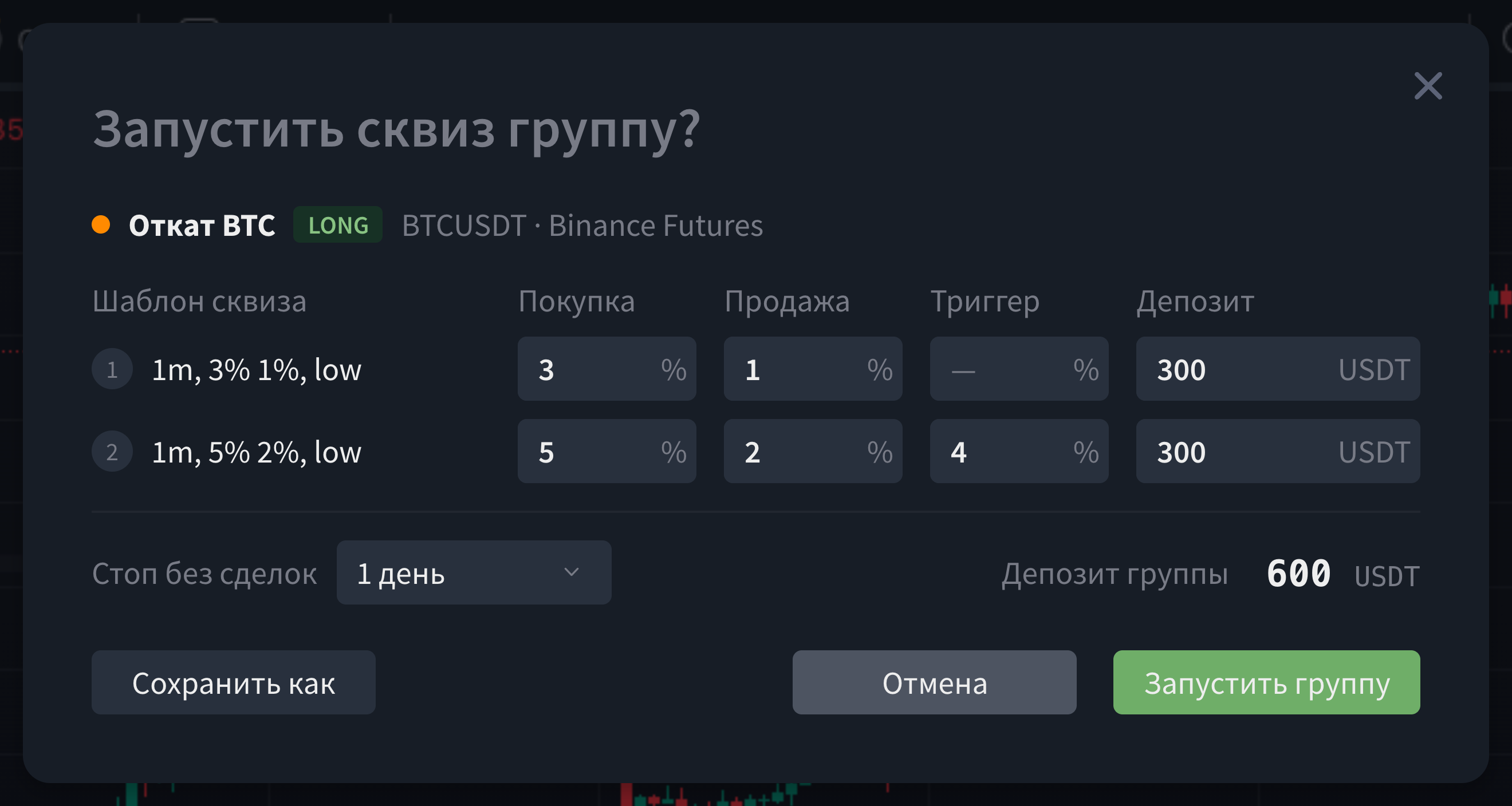
The "Save as" button saves the current numbers as a new group: the percentages become that group's own preset settings, the amounts become the weights. Nothing is launched in the process.
If some of the group's bots fail to be created on the exchange, the rest still launch, and the terminal shows "Created N of M. Check the strategies table."
Strategies table
A group's bots can be collapsed into a single row — the control is the grouping icon to the left of the filters.
Grouping modes: no grouping (flat list), by squeeze group (bots without a group stay as separate rows), by symbol, by exchange, by bot type, by color tag.
In a collapsed group row, the symbol, leverage, side, and margin columns are replaced by the group's name, the pair (or "N pairs"), and an "active / total" badge. The count in the badge covers the whole group, even if some bots are hidden by filters — while the money and PnL totals in the row only cover the visible bots. When the numbers don't match, the badge's tooltip adds "showing N of M by filters".

Actions on a group's row (toggle and gear icon): turn all of the group's bots on/off at once, pause/resume, set one tag on all bots, delete stopped bots, restart the group with a new deposit, open the squeeze groups window on that pair.
Common messages and what they mean
| Message | Reason | What to do |
|---|---|---|
| The plan-limits window opens instead of the groups window | The feature isn't available on the current plan | Upgrade to a plan that supports squeeze groups |
| "+ New group" and "Save as" are disabled, with a group-limit tooltip | The plan's group limit has been reached | Delete an unneeded group or upgrade the plan |
| A red message about the active-squeeze limit at the top of the list | Launching would exceed the plan's limit on simultaneously active squeezes | Stop some squeezes or upgrade the plan |
| Some "Stop if no trades" options are disabled | The plan caps the maximum run duration | Choose one of the available periods |
| The "Start" button is gray, the deposit field has a yellow border | No deposit entered | Enter an amount |
| "Created N of M. Check the strategies table." | Some bots weren't created on the exchange | Check the strategies table: the created bots are running; the missing ones can be added with another launch |
| "Error saving/stopping the group" | The server didn't accept the request | Try again; if it keeps happening, contact support |
Things worth knowing
- Deleting a group doesn't stop its bots — running ones keep working and remain visible under "Running".
- Editing a group doesn't affect bots already running — the new settings apply starting from the next launch.
- The weight sum doesn't have to equal 100% — it's highlighted, but it doesn't block the launch: the deposit is split proportionally.
- The widget counts groups, not bots — a "3" in the ring means three launches, which could contain nine bots between them.
- The widget's PnL covers all pairs, not just the one open on the chart.
- Short groups don't launch on spot — that row is disabled on a spot pair.
- Pausing a group pauses every one of its bots — the "paused" label only appears once absolutely all of them are paused.
Quick answers
Where did my group go? It most likely has the "Asset-only" checkbox on — open a pair with that asset.
Why won't "Start" click? The reason is written right under the group's composition: an empty deposit, the active-squeeze limit, trying to launch a short on spot, or no working presets left in the group.
Fewer bots launched than there are presets — why? Either some presets have no percentages set (such presets are skipped at launch), or some requests to the exchange failed — in that case you'll see "Created N of M."
How do I stop everything at once? In the groups window, "Running" section → "Stop all" button. Or in the strategies table, turn off the toggle on the group's row.
Why is the symbol column empty on a group's row in the strategies table? That's intentional: the pair moved into the group's name, and the freed-up space went to the longer name.
The group's totals don't match the sum of its bots — why? Filters are likely on in the strategies table: the money totals only cover visible bots, while the "active/total" badge covers everyone. The badge's tooltip will say "showing N of M by filters".
Can I change the squeeze percentages for just one launch, without touching the group itself? Yes, in the start window before launching. If you want to keep those values as a new template, use "Save as".
Was this article helpful?
That’s Great!
Thank you for your feedback
Sorry! We couldn't be helpful
Thank you for your feedback
Feedback sent
We appreciate your effort and will try to fix the article
Ready to try it live?
Everything in this guide works in the LEXX terminal — exchange API connections, trading strategies and automation.
Open the terminal About LEXX Platform